Monday, October 24, 2016

Mocking Unit Tests: Get value out of a mocked method

Let's say you have a Save method, and you are unit testing it, and you want to get the "entity" that is getting passed in as a parameter to use in your test.

public voidSave(T entity)
    {
         // Save my stuff
    }


You can do this in your unit test:

FloppyDisk floppyDiskBeingSaved = null;

oldSkoolRepo.Setup(r => r.Save(It.IsAny())).Callback(en =>
{floppyDiskBeingSaved = en;}).Returns(() => Task.FromResult(floppyDiskBeingSaved));

Assert.AreEqual(stuff, floppyDiskBeingSaved);

Monday, August 1, 2016

Simple Calculator with Order of Operations in C#


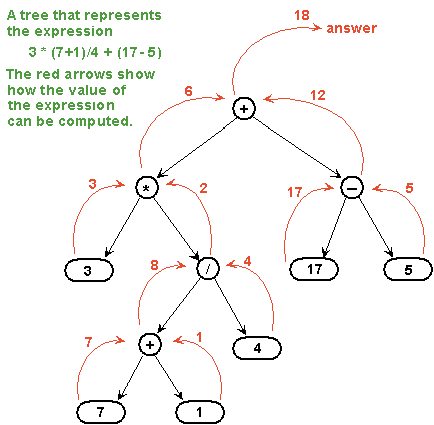
Here is the Calculator with order of operations for multiplication, division, addition, and subtraction. No parenthesis, exponents, or other things included. This is using the tree method. We check for the operation that would be done last from right to left, and this is the first node of the tree. Keep in mind: "multiplication and division are of equal precedence, as are addition and subtraction." Here is an example of how the tree works:
Source: http://math.hws.edu/eck/cs225/s03/binary_trees/expressionTree.gif

This is the Program.cs file below.

namespace ConsoleApplication1
{
    public class Program
    {
        static void Main(string[] args)
        {
            Calc _calculator = new Calc();
            _calculator.InitialPrompt();
        }
    }
}


This is some class file, for ex. Calc.cs below:

using System;
using System.Text.RegularExpressions;

namespace SimpleCalculator
{
    public class Calc
    {
        public double Solve(string equation)
        {
            // Remove all spaces
            equation = Regex.Replace(equation, @"\s+", "");

            Operation operation = new Operation();
            operation.Parse(equation);

            double result = operation.Solve();

            return result;
        }
    }

    public class Operation
    {
        public Operation LeftNumber { get; set; }
        public string Operator { get; set; }
        public Operation RightNumber { get; set; }

        private Regex additionSubtraction = new Regex("[+-]", RegexOptions.RightToLeft);
        private Regex multiplicationDivision = new Regex("[*/]", RegexOptions.RightToLeft);

        public void Parse(string equation)
        {
            var operatorLocation = additionSubtraction.Match(equation);
            if (!operatorLocation.Success)
            {
                operatorLocation = multiplicationDivision.Match(equation);
            }

            if (operatorLocation.Success)
            {
                Operator = operatorLocation.Value;

                LeftNumber = new Operation();
                LeftNumber.Parse(equation.Substring(0, operatorLocation.Index));
                
                RightNumber = new Operation();
                RightNumber.Parse(equation.Substring(operatorLocation.Index + 1));
            }
            else
            {
                Operator = "v";
                result = double.Parse(equation);
            }
        }

        private double result;

        public double Solve()
        {
            switch (Operator)
            {
                case "v":
                    break;
                case "+":
                    result = LeftNumber.Solve() + RightNumber.Solve();
                    break;
                case "-":
                    result = LeftNumber.Solve() - RightNumber.Solve();
                    break;
                case "*":
                    result = LeftNumber.Solve() * RightNumber.Solve();
                    break;
                case "/":
                    result = LeftNumber.Solve() / RightNumber.Solve();
                    break;
                default:
                    throw new Exception("Call Parse first.");
            }

            return result;
        }
    }
}


Monday, July 25, 2016

Simple Budget Calculator in C#


Here's another word problem similar to the calculator with word problem and solution included!

I would like a budget calculator for this month to see how much over or under budget I was last month. The application will prompt me for my total budget for last month when I start the application.

Once I enter my total budget, it will ask me the following:
  • How much did you spend on groceries?
  • How much did you spend eating out?
  • How much did you spend on fuel?
  • How much did you spend on entertainment?
At the end, the application will tell me how much money I either over-spent or under-spent. Make sure it works for both over- and under- spending. For example, the console should look like this:


This is the Program.cs file below.

namespace SimpleCalc
{
    public class Program
    {

        static void Main(string[] args)
        {
            BudgetClass budgetClass = new BudgetClass();
            budgetClass.Budget();
        }

    }
}


This is some class file, for ex. BudgetClass.cs below:

using System;

namespace SimpleCalc
{
    public class BudgetClass
    {
        private int budget;
        private int spent;
        private int result;

        public void Budget()
        {
            Console.WriteLine("What is your budget?");
            int newBudget = int.Parse(Console.ReadLine());
            budget = newBudget;

            Console.WriteLine("How much did you spend on groceries?");
            Prompt();

            Console.WriteLine("How much did you spend eating out?");
            Prompt();

            Console.WriteLine("How much did you spend on fuel?");
            Prompt();

            Console.WriteLine("How much did you spend on entertainment?");
            Prompt();

            string overOrUnder = OverOrUnder(result);
            Console.WriteLine("You spent $" + result + " " + overOrUnder + " your budget.");
            Console.ReadLine();
        }

        public void Prompt()
        {
            spent = int.Parse(Console.ReadLine());
            result = Calculate(spent);
        }

        public int Calculate(int spent)
        {
            budget = budget - spent;
            return budget;
        }

        public string OverOrUnder(int result)
        {
            if (result >= 0) return "under";

            return "over";
        }
    }
}


Simple Calculator without Order of Operations in C#


I have recently started a new job, and with it I decided to do mentoring for a junior developer program. Because of this, I will be working on puzzles / mini-apps with them and I will be posting my solutions to them here for anyone else to use :). It is easiest for me to guide when I solve the problem beforehand. Below is a C# calculator without order of operations (to keep it simple this is a good starting place). Next will be one with order of operations using the tree method.

This is the Program.cs file below.

namespace ConsoleApplication1
{
    public class Program
    {
        static void Main(string[] args)
        {
            Calculator _calculator = new Calculator();
            _calculator.InitialPrompt();
        }
    }
}


This is some class file, for ex. Calculator.cs below:

using System;

namespace ConsoleApplication1
{
    public class Calculator
    {
        public void InitialPrompt()
        {
            Console.WriteLine("1st number");
            decimal firstNum = int.Parse(Console.ReadLine());

            Console.WriteLine("operation");

            SharedPrompt(firstNum);
        }

        public void ContinuedPrompt(decimal previousSolution)
        {
            decimal firstNum = previousSolution;

            Console.WriteLine("Your previous solution was: " + previousSolution);
            Console.WriteLine("What operation would you like to do to this previous solution?");

            SharedPrompt(firstNum);
        }

        public void SharedPrompt(decimal firstNum)
        {
            string oper = Console.ReadLine();

            Console.WriteLine("2nd number");
            decimal secondNum = int.Parse(Console.ReadLine());

            decimal solution = Calculate(firstNum, oper, secondNum);

            Console.WriteLine("Your answer is: " + solution);
            Console.ReadLine();

            Console.WriteLine("Would you like to continue, do a new problem, or quit? C/N/Q?");
            string nextStep = Console.ReadLine();

            // Continue with same problem
            if (nextStep == "C")
            {
                ContinuedPrompt(solution);
            }

            // New problem
            else if (nextStep == "N")
            {
                InitialPrompt();
            }
        }

        public decimal Calculate(decimal firstNum, string oper, decimal secondNum)
        {
            decimal solution = 0;

            switch (oper)
            {
                case "+":
                    solution = firstNum + secondNum;
                    break;
                case "-":
                    solution = firstNum - secondNum;
                    break;
                case "*":
                    solution = firstNum * secondNum;
                    break;
                case "/":
                    solution = firstNum / secondNum;
                    break;
            }

            return solution;
        }
    }
}


Thursday, June 9, 2016

If I could change one thing with software...


If I could change one thing with software... I would fix the medical system as much as software could.

I would make it so patients knew ahead of time how much their visit would cost, taking into account the specific doctor's office and their insurance. It shouldn't take months later to be mailed a bill. No one would consider it reasonable to buy groceries and mysteriously get a bill in the mail months later and have no scope of how much it would cost.

I would make a portal that makes it easy to find a good doctor who takes your insurance. The portal would keep track of all your insurance company info and claims. You could find a doctor who has reviews and where you can make appointments online easily without waiting hours on the phone. I'd make one large comprehensive medical form you could fill out once and then it will send to any doctors you need to see so you don't fill out the form 20x for the same issue in different offices.

I would make a universal medical records system that is ported immediately to a central system. If a patient landed in a hospital, their blood type, contraindicated medications, and medical history would be immediately known. It should be able to be looked up by even a finger print to avoid as many John Does.

I would force insurance companies, pharmacies, doctor's offices, hospitals, medical imaging, dentists, and patients to have a synchronized easy to use system where each part communicated with each other.

I would make a company that just buys out the old almost noncollectable debt on the cheap, and ask for donations just to buy and forgive more medical debt. We shouldn't go into financial stress or bankruptcy in order to stay healthy and keep our families healthy. But I need more than just software to make this happen. I need strong belief in this, tons of support, a way to get through politics, laws, and a massive security system to protect everyone's information.

Just a small fun rant :).

Tuesday, May 3, 2016

How do self-taught developers actually get jobs?


I posted again on Quora to give some more insight about how a self-taught developer can get a job and some specifics. Hope this can help someone both with the tips and in believing they can do it! There are some really great answers on stories from other users, check them out! Click to:

See My Response

(Posting a link to the actual post so I can update it as needed in one place!)

Monday, May 2, 2016

Running Web Job on Schedule


To get a Web Job, start by making a Web App. The Web Job is associated with the Web App. You can either actually use the Web App, or just make an empty one as a placeholder for your Web Job. Web Jobs can be used for: continuously running a background task at a certain time interval in the cloud. In order to run a web job on a schedule, you have to include the Web Job NuGet package. You can either setup a normal console application, or setup a "web jobs" console application (which has the Web Job references already added for you along with the JobHostConfiguration code below). You can add the [TimerTrigger] attribute as a parameter into the main function you would like to use. Make sure to put the JobHostConfiguration into the Main method, if you do not then your web job will likely continuously loop and not work.

using System;
using System.Net;
using Microsoft.Azure.WebJobs;

namespace Stuff
{
    public class Program
    {
        public static void Main(string[] args)
        {
            JobHostConfiguration config = new JobHostConfiguration();
            config.UseTimers();

            JobHost host = new JobHost(config);
            host.RunAndBlock();
        }

        public static void ProcessDataTransfer([TimerTrigger("01:00:00", RunOnStartup = true)] TimerInfo timerInfo)
        {
            // Your Starting Method Code Here
        }
    }
}