Thursday, June 26, 2014
Tuesday, June 24, 2014
SQL: SELECT Joins (and their usage) [Part IV]
1. Inner Join = selects records where joined keys are in BOTH specified tables.
2. Left Outer Join = selects all from the first (left) table, and matching records from the second (right) table.
3. Right Outer Join = selects all from the first second (right), and matching records from the first (left)table. Below is example #1: Inner Join.
-- Select only salmon salad and its photos. This is a innnerjoin (synonym to equijoin). not what we want here. -- If there are no photos, then it is not coming back! select * from dbo.Recipes recipes, dbo.RecipePhotos photos where recipes.RecipeId = photos.RecipeId and recipes.Title = 'Salmon Salad' GOBelow is example #2: Left Outer Join. I want you to notice comparisons between this and the above example. Both of them work and give the same result. Capital letters don't make a difference in SQL Server. And notice how the syntax changes between Example #1 and #2. However, it is NOT best to use example #1. WHY? If both work why not? Well.. let's keep going..
-- Left outer (this is what we would want! photos are ok and optional) for salmon salad. SELECT * FROM dbo.Recipes recipes LEFT JOIN dbo.RecipePhotos photos ON recipes.RecipeId = photos.RecipeId WHERE recipes.Title = 'Salmon Salad'Below is ANOTHER example of #2: Left Outer Join with a null. Remember that I want to give the users on the site a CHOICE to not add a photo.. maybe they don't have one etc. I certainly don't want it to blow up and not work just because they have a great recipe and no photo. In addition, I don't want them finding some crazy "workaround" to my mistake if I made it an Inner Join where they would upload a 1x1 pixel of white JPEG or something just to make my program happy. Customers first! The Left Outer Join allows them to have a null and be ok, whereas the Inner Join REQUIRES BOTH TABLES as seen in the written SQL in the very first example I gave above.
-- Left outer join SELECT * FROM dbo.Recipes recipes LEFT JOIN dbo.RecipePhotos photos ON recipes.RecipeId = photos.RecipeId WHERE recipes.Title = 'KFC Chicken' -- ORDER BY Recipes.RecipeID;You can also specify how to order them, but I chose to exclude this in my SQL above as can be seen. Well, what happened to an example of #3 Right Outer Join? This is why I believe that this is not a terribly useful tool (feel free to disagree with me in the comments below if you can think of a good reason to use this and enlighten me!). Say you need stuff out of some table on the second right called VARIABLE_Y and to check with the table on the first left VARIABLE_X. We will use this as an example as Right Outer Join.
-- Right outer SELECT * FROM dbo.VARIABLE_Y recipes RIGHT JOIN dbo.VARIABLE_X photos ON recipes.RecipeId = photos.RecipeId WHERE recipes.Title = 'la la la'Now, tell me why this isn't easier? Just swap out the variables (X and Y) and make it a Left Outer Join. It does the same thing :D
-- Left outer SELECT * FROM dbo.VARIABLE_X recipes LEFT JOIN dbo.VARIABLE_Y photos ON recipes.RecipeId = photos.RecipeId WHERE recipes.Title = 'la la la'
SQL: DML continued & Foreign Keys (parent/child tables) [Part III]
INSERT dbo.Recipes (Title, Directions, Ingredients)
VALUES ('Chicken', 'Fry with olive oil', 'chicken, olive oil')
GO
INSERT dbo.RecipePhotos (FilePath, RecipeId)
VALUES ('http://mysite.com/recipe1.jpeg', 1)
GO
INSERT dbo.Recipes (Title, Directions, Ingredients)
VALUES ('Salmon Salad', 'Add lettuce, tomato, and cucumbers. Mix.', 'salmon, lettuce, tomato, cucumbers')
GO
INSERT dbo.Recipes (Title, Directions, Ingredients)
VALUES ('Tilapia Soup', 'Add soup. Add tilapia.', 'tilapia, soup')
GO
--To delete one, tell it WHERE you want it to be deleted from!
DELETE FROM dbo.Recipes
WHERE RecipeID=4;
GO
--To delete multiple, you must use an or statement
DELETE FROM dbo.Recipes
WHERE RecipeID=5 or RecipeID=6;
GO
UPDATE dbo.Recipes
SET Directions = 'Make the soup. Add tilapia on top of soup.'
WHERE RecipeID = 3
GO
--Deletes everything in this database
DELETE FROM dbo.RecipePhotos
GO
--Deletes everything in this database
DELETE FROM dbo.Recipes
GO
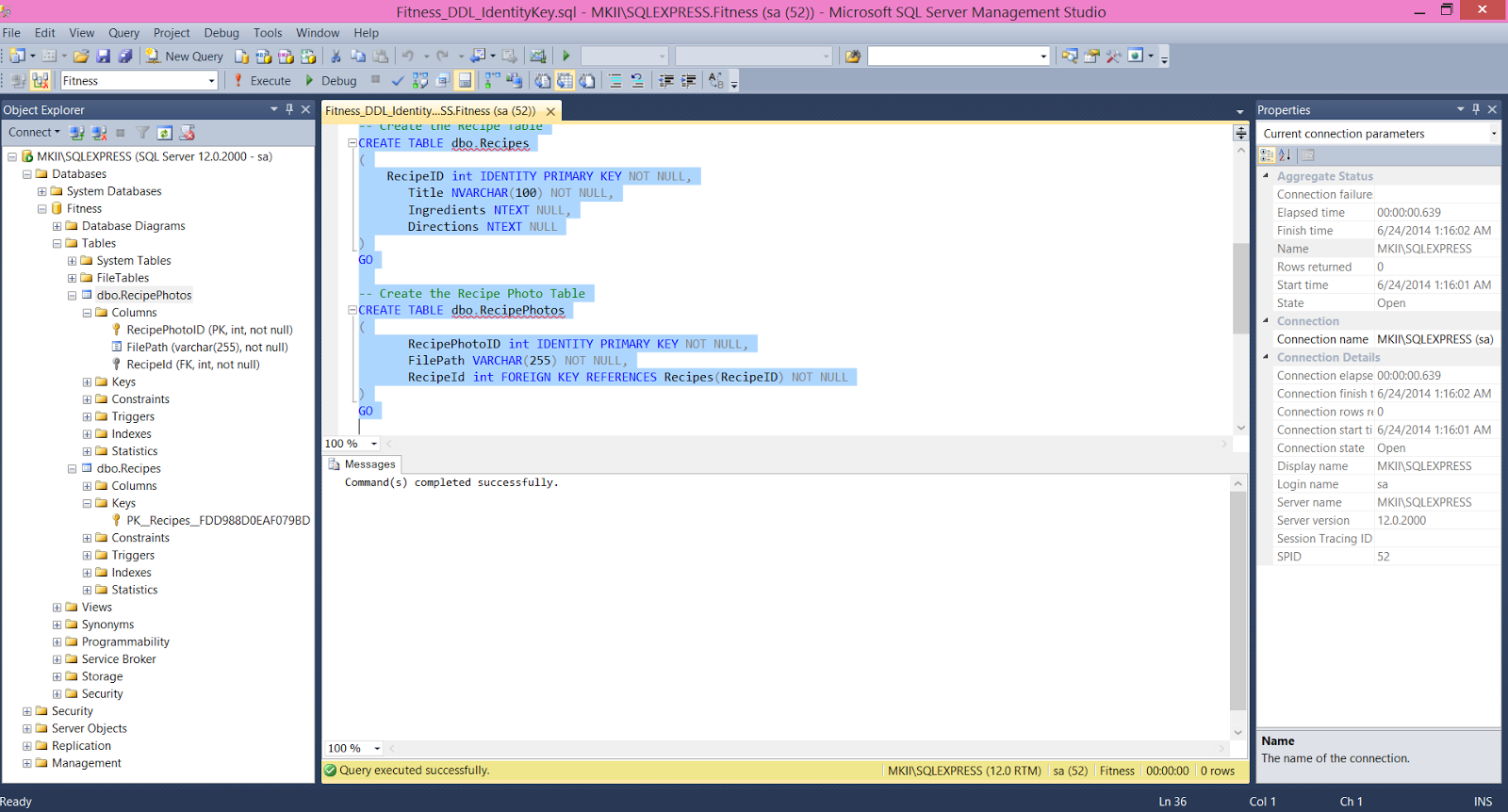
I have 2 databases in this: dbo.Recipes and dbo.RecipePhotos, and the dbo.RecipePhotos is the child to the parent dbo.Recipes because I want to allow users to choose as many photos as they would like (more on part IV if the user chooses to not upload any and how to avoid a null/mental breakdown/implosion of your work). If you look at the leftmost column of my screen you can see how both db are shown and that there is the unique key for the main dbo.Recipes, and how the dbo.RecipePhotos has an FK = foreign key. The fact this dbo.RecipePhotos carries the foreign key means it is the referencing/child table.. and thus making the table with the candidate/matching key the parent table that is being referenced.
SQL: Data Manipulation Language (DML) [Part II]
- INSERT - insert data into a table
- UPDATE - updates existing data
- DELETE - deletes data, can determine what columns/types/or if all data but leave table/or if whole table
- SELECT - retrieve data from the a database (more on this later in part IV with joining tables)
USE Fitness
GO
-- Inserting data into a table
INSERT INTO dbo.Recipes (Title, Directions, Ingredients)
VALUES ('Chicken', 'Fry with olive oil', 'chicken', olive oil')
GO
INSERT INTO dbo.Recipes (Title, Directions, Ingredients)
VALUES ('Salmon Salad', 'Add lettuce, tomato, and cucumbers. Mix.', 'salmon, lettuce, tomato, cucumbers')
GO
INSERT INTO dbo.Recipes (Title, Directions, Ingredients)
VALUES ('Tilapia Soup', 'Add soup. Add tilapia.', 'tilapia, soup')
GO
INSERT INTO dbo.Recipes (Title, Directions, Ingredients)
VALUES ('KFC chicken', 'Drive to KFC, pickup chicken', 'car, chicken')
GO
INSERT INTO dbo.RecipePhotos (FilePath, RecipeId)
VALUES ('http://mysite.com/chicken_recipe_1.jpeg',
(SELECT RecipeId FROM dbo.Recipes WHERE Title='Chicken'))
GO
INSERT INTO dbo.RecipePhotos (FilePath, RecipeId)
VALUES ('http://mysite.com/chicken_recipe_2.jpeg',
(SELECT RecipeId FROM dbo.Recipes WHERE Title='Chicken'))
GO
INSERT INTO dbo.RecipePhotos (FilePath, RecipeId)
VALUES ('http://mysite.com/chicken_recipe_3.jpeg',
(SELECT RecipeId FROM dbo.Recipes WHERE Title='Chicken'))
GO
INSERT INTO dbo.RecipePhotos (FilePath, RecipeId)
VALUES ('http://mysite.com/salmon_salad1.jpeg',
(SELECT RecipeId FROM dbo.Recipes WHERE Title='Salmon Salad'))
GO
INSERT INTO dbo.RecipePhotos (FilePath, RecipeId)
VALUES ('http://mysite.com/salmon_salad2.jpeg',
(SELECT RecipeId FROM dbo.Recipes WHERE Title='Salmon Salad'))
GO
INSERT INTO dbo.RecipePhotos (FilePath, RecipeId)
VALUES ('http://mysite.com/tilapia_soup1.jpeg',
(SELECT RecipeId FROM dbo.Recipes WHERE Title='Tilapia Soup'))
GO
Note when you put these into the SQL.. and you hit execute, it will execute everything ABOVE your cursor. If you only highlight a section and hit execute, only that part will be executed. So if you do half of it, execute, then add more, you will want to only highlight the new portion. It will be in yellow for SQL Server but definitely depends on what you are using (could be different years, Oracle, etc.). If you execute the entire file again, you will have duplicates of the beginning half.
SQL: Data Definition Language (DDL) [Part I]
Really, really basic, but don't ever forget this:
A COLUMN goes up and down, like a Greek/Egyptian/Roman column. :D
A ROW goes sideways because you ROW a boat from the side (perpendicular to the boat) to move. Rowing up and down would get you nowhere. Honestly the main functions here are pretty self explanatory (which is GREAT!):
- CREATE - create objects in database
- RENAME - rename object
- COMMENT - add comments to data dictionary
- ALTER - alters database structure
- DROP - delete objects from database
USE master
GO
-- Delete the Fitness database if it exists.
IF EXISTS(SELECT * from sys.databases WHERE name='Fitness')
BEGIN
DROP DATABASE Fitness
END
If you're unsure if you already created the database, or if you want to start it fresh.. put this at the beginning. This will clear out an existing
-- Create a new database called Fitness. CREATE DATABASE Fitness GOThis actually creates the database.
-- Now that we have created the Fitness Databse, Use it
USE Fitness
GO
-- Create the Recipe Table
CREATE TABLE dbo.Recipes
(
RecipeID int IDENTITY PRIMARY KEY NOT NULL,
Title NVARCHAR(100) NOT NULL,
Ingredients NTEXT NULL,
Directions NTEXT NULL
)
GO
-- Create the Recipe Photo Table
CREATE TABLE dbo.RecipePhotos
(
RecipePhotoID int IDENTITY PRIMARY KEY NOT NULL,
FilePath VARCHAR(255) NOT NULL,
RecipeId int FOREIGN KEY REFERENCES Recipes(RecipeID) NOT NULL
)
GO
Note the word IDENTITY in here. This will allow the database to automatically add the unique key each row added to the database. If you do not include it, you will have to add in the "RecipeID" as a column too. This will be described more in later parts of this small SQL example.
Saturday, June 21, 2014
Fun with Nuances (C# Attributes vs. Properties)!
A property is a type of method (accessor) that are used like a public data member.. but they give you a way to read/write/evaluate some private field. This = safety + flexibility in your code.
Properties usually edit the attributes.
Just something new and fun. This is what we use today (some synonymous hybrid mix "thing"):
// New auto-property after .NET 3.0
public String Name { get; set; }
In a lot of ways, this is easier, shorter, and MUCH nicer to the eye!
This is what we used to use
// Old-fashioned attribute (before .NET 3.0)
private String _title;
// Old-fashioned property (before .NET 3.0)
public String Title
{
get { return _title; }
set { _title = value; }
}
However, you lose the ability/flexibility to edit the individual parts of it when the attribute used to be wrapped around a layer of property! There are only rare instances you would need this.. but those times do exist!
Here is one for you! For instance.. if you are making a "dummy" database and seeding it -- let's say you were making a nice end to end ASP .NET MVC.. and you did not want to open up a SQL database just yet. This "dummy" database would help you bounce off your ideas for the MVC with its own little pseudo-database that is made just to get things up and running a little quicker on the front end! So.. you could not do this:
private List _recipes = new List
{
new Recipe() {ID = 1, Title = "My yummy food", Directions = "Put directions here.", Ingredients = "Yummy, Delicious, Butter"},
new Recipe() {ID = 2, Title = "My 2nd yummy food", Directions = "More directions here.", Ingredients = "Yummy, Delicious, Sugah"},
new Recipe() {ID = 3, Title = "My 3rd yummy food", Directions = "All these directions!", Ingredients = "Yummy, Delicious, Synonym-of-Yummy-Delicious"},
};
// THIS WILL NOT WORK below!!! EQUALS SAD little code!!!
public List Recipes { get; set; }
.. for the reason stated above (you can't edit the specific attribute and property out!).
However.. this works as a whole!
private List _recipes = new List
{
new Recipe() {ID = 1, Title = "My yummy food", Directions = "Put directions here.", Ingredients = "Yummy, Delicious, Butter"},
new Recipe() {ID = 2, Title = "My 2nd yummy food", Directions = "More directions here.", Ingredients = "Yummy, Delicious, Sugah"},
new Recipe() {ID = 3, Title = "My 3rd yummy food", Directions = "All these directions!", Ingredients = "Yummy, Delicious, Synonym-of-Yummy-Delicious"},
};
// HAPPY LITTLE CODE ;)
public List Recipes
{
get { return _recipes; }
set { _recipes = value; }
}
See how the variable _recipes is actually used now??? This is one of those useful rare instances..
Wednesday, June 4, 2014
Variables and Data Types
;
NOTE the semi-colon (;) at the end of these statements! This semi-colon is known as a line terminator, and its purpose is to tell the compiler the specific "line" or segment of code is completed. It can be useful if you wanted to break one segment of code (one action) into multiple lines to make it easier to logically read/understand, but to the compiler it is simply one code.
Data type can be filled in with any valid C# data type. Here is a summary of the main ones below. In addition, you can also make a user-defined data type. Another option is that the variable list can have multiple types that are separated with a comma.
int (integer) has the same definition here as it would in math! And integer will store whole numbers without decimals. is short for integer, a data type for storing numbers without decimals. This is the most common type for using numbers! It will store positive and negative whole numbers inclusive from [-2147483648 to 2147483647] because it is 32-bit (meaning it is equal to 2^32).. let me know when it goes above that (if ever!).. although as a chemist I know quite a few variables larger than int would not be able to handle..
long is a bigger version of int and rarely utilized. This is 64-bit and hence, 2^64. Your range of numbers here would be -9223372036854775808 to 9223372036854775807.
decimal is a 128-bit data type that is commonly used when representing: $$$.
string is used for storing multiple characters (random characters, a word, a phrase, or a name). In C#, strings are immutable, AKA not able to be changed. So, if a method changes a string.. what it really does is return a new string.
char is for storing one single character.
bool is has 2 vales: true and false. This is great for logical if/then type of statements.
float is for storing data that may/may not have decimals. It has less precision and a larger range than decimal (the $$$ one) and is usually used for other sets of decimal numbers like in arithmetic type of calculations.
So, do you remember this?
;
How to actually define a variable:
int x;
If you want to do multiple variables:
int x, y, z;
You could write it this way too (they are equivalent!):
int x; int y; int z;
You assign an initial value by using this general formula:
variable name = value;
How to actually initialize a variable :
int x = 10; int y = 25; int z = 100;
Here is a larger example that puts the concepts all together (literally adding them):
namespace VariableDefinition
using System;
using System.Collections.Generic;
using System.Linq;
using System.Text;
using System.Threading.Tasks;
namespace ConsoleApplication3
{
class Program
{
static void Main(string[] args)
{
// Define variables
int x, y, z;
// Initialize each
x = 10;
y = 25;
z = 100;
// You can also initalize and make your own variable
int a, b, c;
a = x + y;
b = z + 10;
c = x + y + z;
Console.WriteLine("x = {0}, y = {1}, z = {2}", x, y, z);
Console.WriteLine("a = {0}, b = {1}, c = {2}", a, b, c);
Console.ReadLine();
}
}
}
Using this, you will get the following output
x = 10, y = 25, z = 100 a = 35, b = 110, c = 135
So the general basic rule for adding in data types is to follow this:
=